
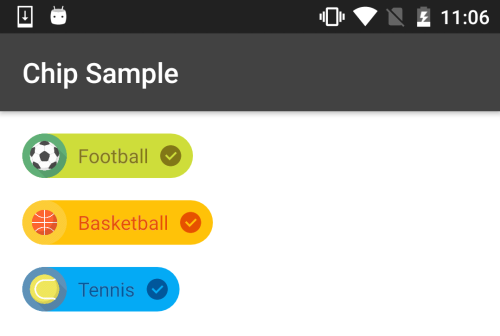
Now social media is on hike and many of social apps are creating but if you want your app also goes on hike then you should think different from other developers. For this perspective i came with Material chip view which can be used as tags for categories, contacts or creating text clouds.
How you can add Material chip view
Gradle:
Add following line of code to your module(app) level gradle file
compile 'com.robertlevonyan.view:MaterialChipView:1.0.1'
Maven:
<dependency>
    <groupId>com.robertlevonyan.view</groupId>
    <artifactId>MaterialChipView</artifactId>
    <version>1.0.1</version>
    <type>pom</type>
  </dependency>
Recommended articles :
- FingerprintManager – Handle Android fingerprint API
- ScribeJava – OAuth client Java library
- Two Panels Layout Animation Android Library
- Bubble Tab Animation Library Android
Usage
<com.robertlevonyan.views.chip.Chip
    android:id="@+id/chip"
    android:layout_width="wrap_content"
    android:layout_height="wrap_content"
    app:mcv_chipText="@string/customTitle" />
Cutomizing Chip
app:mcv_closable="true"

app:mcv_selectable="true"

app:mcv_hasIcon="true"
    app:mcv_chipIcon="@drawable/customIcon"

app:mcv_backgroundColor="@color/customChipBackgroundColor"
   app:mcv_closeColor="@color/customCloseIconColor"
   app:mcv_selectedBackgroundColor="@color/customSelectedChipColor"
   app:mcv_textColor="@color/customTitleColor"

Attributes
Custom Atributes Description app:mcv_chipText Text label of Chip app:mcv_textColor Custom color for text labelapp:mcv_backgroundColor Custom background color app:mcv_selectedBackgroundColor Custom background color when selectedapp:mcv_hasIcon Chip with icon app:mcv_chipIcon Icon resource for Chip app:mcv_closable Chip with close button app:mcv_closeColorCustom color for close button app:mcv_selectable Chip with selection button app:mcv_selectedTextColor Custom color for label when selected app:mcv_selectedCloseColor Custom color for close button when selected
Setting Listeners
Chip chip = (Chip) findViewById(R.id.chip);
Chip click listener
chip.setOnChipClickListener(new OnChipClickListener() {
            @Override
            public void onChipClick(View v) {
                //Your action here...
            }
        });
On Close button click listener
chip.setOnCloseClickListener(new OnCloseClickListener() {
            @Override
            public void onCloseClick(View v) {
                //Your action here...
            }
        });
On Icon click listener
chip.setOnIconClickListener(new OnIconClickListener() {
            @Override
            public void onIconClick(View v) {
                //Your action here...
            }
        });
On Select button click listener
chip.setOnSelectClickListener(new OnSelectClickListener() {
            @Override
            public void onSelectClick(View v, boolean selected) {
                //Your action here...
            }
        });
Customizing Chip from Java
chip.setChipText(); // Set Chip label
        chip.setTextColor(); // Set Chip label color
        chip.changeBackgroundColor(); //Set custom background color
        chip.changeSelectedBackgroundColor(); //Set custom background color when selected
        chip.setHasIcon(); //Set chip has icon
        chip.setChipIcon(); //Set Icon Drawable for Chip
        chip.setClosable(); //Set Chip has close button
        chip.setCloseColor(); //Set custom color for close button
        chip.setSelectable(); //Set Chip has selection button
        chip.setSelectedTextColor(); //Set custom color for label when selected
        chip.setSelectedCloseColor(); //Set custom color for close button when selected
Hope you like this tutorial. Please comment below and share your thought with us.
 Nuur Hasan
Share your thoughts