

Expandable Recycler is not new concept in Android application but today i am going to show you a library which can provide expand & collapse state for recyclerview in fast and easy way.
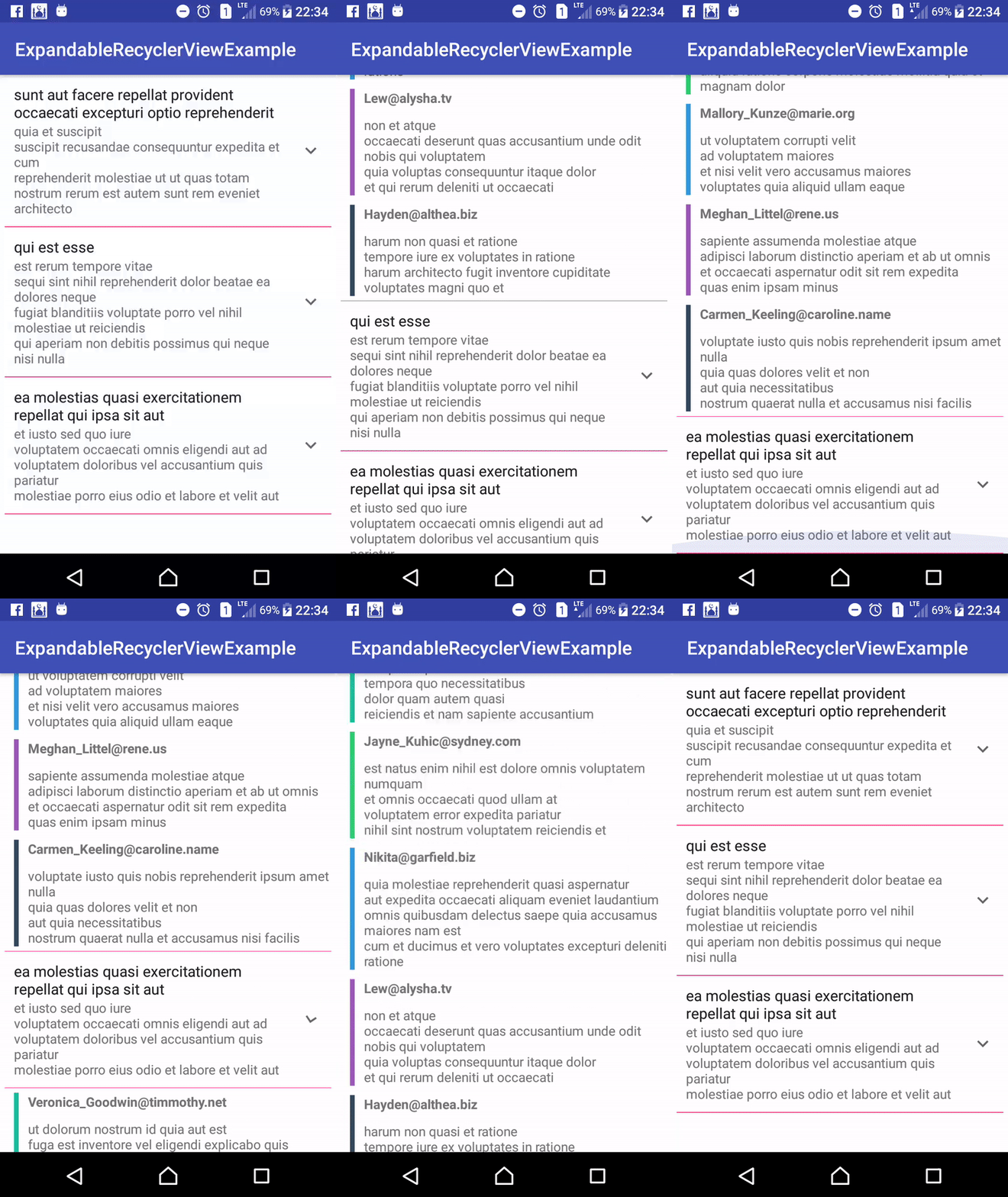
At Google IO 2014, Google introduced the RecyclerView widget – an entirely updated approach to showing a collection of data. RecyclerView was designed to be more flexible and extendable than its predecessor, ListView. While most of what RecyclerView offers is an improvement over the existing functionality of ListView, there are a few notable features missing from the RecyclerView API.
You must see this : Android MVP Pattern Example
For example, we lost our dear friend OnItemClickListener and our lesser, but still kinda close friend, ChoiceModes. And if all that lost functionality wasn’t depressing enough, we also lost all of the subclasses and custom implementations of ListView, like ExpandableListView.
How to implement Expandable Recycler In Android?
You must see this : Add Expanding Panel in Android
Including In Your Project
If you are a Maven user you can easily include the library by specifying it as a dependency:
Maven
<dependency>
  <groupId>com.infideap.expandablerecycler</groupId>
  <artifactId>expandable-recycler</artifactId>
  <version>0.0.1</version>
  <type>pom</type>
</dependency>
Gradle
dependencies {
   implementation 'com.infideap.expandablerecycler:expandable-recycler:0.0.1'
}
if the gradle unable to sync, you may include this line in project level gradle,
repositories {
 maven{
   url "https://dl.bintray.com/infideap2/expandable-recycler"
 }
}
or, you can include it by download this project and import /expandable-recycler as module.
How to use Expandable Recycler?
You can use RecyclerView library provide by Google, not necessary to use ExpandableRecycler in this library (Just gimmick).
Must read : Case Study : Infinite Scrolling V/s Pagination
Then, in java class, use ExpandableRecycler.Adapter as RecyclerView’s adapter. Like below :
public class PostExpandableRecyclerViewAdapter extends ExpandableRecycler.Adapter<PostExpandableRecyclerViewAdapter.ViewHolder> {

   ...

   @Override
    public void onBindViewHolder(final ViewHolder holder, final int position) {
        holder.mItem = mValues.get(position);
        //call this method after assign holder's item
        super.onBindViewHolder(holder, position);


    }

    /**
     *
     * @param position
     * @return number of child for specific position/index
     */
    @Override
    public int getChildCount(int position) {
        return mValues.get(position).comments.size();
    }

    ...


    public class ViewHolder extends ExpandableRecycler.ViewHolder {
        View view;
        TextView titleView;
        TextView postView;
        View childView;
        View parentView;

        public Post mItem;

        public ViewHolder(Context context, ViewGroup parent) {
            super(context, parent);
            view = itemView;

        }

        @Override
        public View getView(Context context, ViewGroup parent) {

            parentView = LayoutInflater.from(context).inflate(R.layout.fragement_post_parent, parent, false);

            titleView = (TextView) parentView.findViewById(R.id.textView_title);
            postView = (TextView) parentView.findViewById(R.id.textView_post);

            titleView.setText(mItem.title);
            postView.setText(mItem.body);

            return parentView;
        }

        @Override
        public View getChildView(Context context, ViewGroup parent, int childPosition) {
            childView = LayoutInflater.from(context).inflate(R.layout.fragment_post_child, parent, false);
            TextView emailTextView = (TextView) childView.findViewById(R.id.textView_email);
            TextView commentTextView = (TextView) childView.findViewById(R.id.textView_comment);
            emailTextView.setText(mItem.comments.get(childPosition).email);
            commentTextView.setText(mItem.comments.get(childPosition).body);

            childView.findViewById(R.id.bookmark).setBackgroundColor(colors[childPosition % colors.length]);
            return childView;
        }


        @Override
        public String toString() {
            return super.toString() + " '" + postView.getText() + "'";
        }
    }
}
That’s it. Really i finished the implementation of this magical library. If you like this then please share with your friends so they can also know about this library.
[reposcript id=”git_repo” gituser=”shiburagi” gitname=”ExpandableRecycler”]
 Nuur Hasan
Share your thoughts